HD — Administrator's Guide
Everything needed to stand up an HD instance and keep it standing: what the system is, what it is made of, what it needs from your hardware and network, and every option the installer offers.
This documents HD v2.0.3. Every image it names is
cr.fermihdi.io/hd/<service>:2.0.3.
It assumes you administer Linux hosts and containers. It assumes nothing about
FermiHDI. If you only want the commands, README.md beside this
file is the short version; everything here is the reasoning behind it.
What HD is
HD is a record store built for one thing: taking in enormous volumes of small, uniform records and answering questions about them without the kernel getting in the way. Network packets bypass the kernel through DPDK; disk writes bypass the filesystem through SPDK, straight to NVMe queues. The work runs on cores nothing else is allowed to touch.
That single design choice is behind almost every requirement in this guide. Poll mode threads spin on dedicated cores and must not be preempted. Buffers are allocated up front in hugepages and must not be swapped. Devices are taken from the kernel and handed to the process. None of it can be arranged after a container starts, which is why installation is two distinct acts — preparing a host, then running containers on it — and why the first one changes the kernel command line and usually needs a reboot.
One instance is a deployment: one DMS, one or more Storage Clusters, and the edge and access services around them. Everything in it trusts one certificate authority and registers with one DMS.
What it is made of
| Component | Language | Does |
|---|---|---|
| DMS-Core | Go | The authority. Registers nodes, issues their configuration, holds the topology, the schema and the license |
| DMS-CA | Go | The certificate authority. Signs every identity in the deployment |
| DMS-OPA-Engine | Go | Compiles and serves the policy bundles the Proxy enforces |
| DMS-OPA-Adapter | Go | Optional. Polls an external OPA control plane and hands bundles to the engine |
| DMS-WebUX | Astro + Node | The admin UI, and the only thing that can apply a license interactively |
| SCC | C++ / HD engine | Storage Cluster Controller. The gateway in front of a set of Storage Nodes: fans writes out to them, load-balances queries across them |
| Storage Node (SN) | C++ / HD engine | Where records live. DPDK on the wire, SPDK to the NVMe |
| BloomRF filter node | C++ / HD engine | Optional, at most one per storage cluster. Takes the SCC's ingest broadcast exactly as an SN does and keeps a small filter per batch instead of the records, so at query time the SCC can leave unread the batches that cannot match. Holds no device and persists nothing: its store is rebuilt from the stream |
| Ingester | C++ / HD engine | Reads a message bus, parses records without allocating, and streams them to an SCC. Kafka is what the installer wires; the ingester itself also reads RabbitMQ and object stores |
| HD Proxy | Go | The query front door. Enforces policy, rewrites queries it must restrict, scatters them to the SCCs and gathers the results |
| hd_graphql / hd_mcp | Go + the SDK | GraphQL and MCP front ends onto the Proxy |
| hd_sql | Go + the SDK | A read-only SQL front end onto the Proxy: PostgreSQL wire, Arrow Flight SQL and HTTP from one engine. Run from its published image beside the Proxy; the cluster file has no role for it |
| Data explorer | — | Optional web UI over the Proxy |
| OTEL collector | — | Where every service sends traces and metrics |
Two shapes of service, and the difference decides everything about placement:
- Engine roles — SCC, SN, the filter node, Ingester, and the GraphQL and MCP front ends. Pinned cores, hugepages, one reactor per core. These are the ones with hard requirements.
- Go and Node services — the DMS plane and the Proxy. Ordinary processes with ordinary needs.
How it fits together
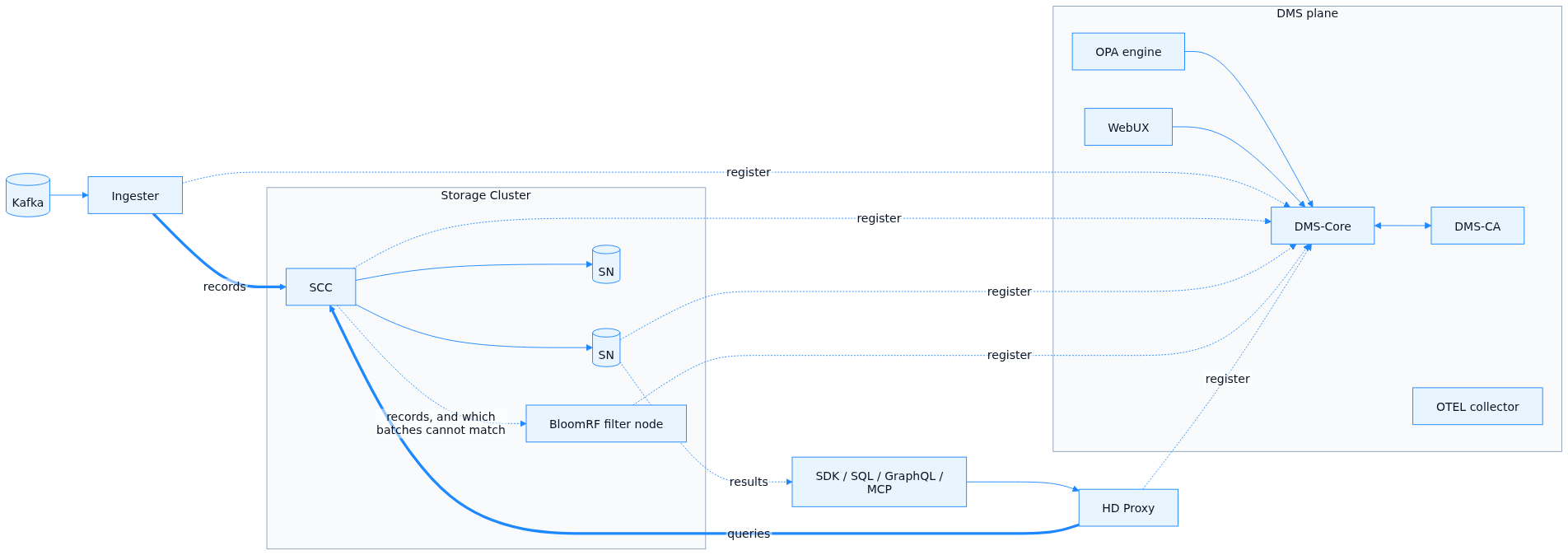
Three planes, and a node works out its own address on each by matching its interfaces against the CIDRs you declare:
| Plane | Carries | Typical |
|---|---|---|
| Control | Registration, configuration, cluster coordination | 10.147.0.0/24 |
| Data | Records in, results out — the FHDWP wire protocol | 10.150.0.0/24 |
| Observability | Traces, metrics, health | 10.146.0.0/24 |
They can share one interface on a small deployment. On a multi-homed host they must not be left unset, or each node picks an interface by itself and half of them will pick differently.
The three flows:
- Ingest. Kafka → Ingester (parses, slices into fixed-size records) → SCC over FHDWP → fanned out to every SN in the cluster. Each SN holds a full replica of the cluster's dataset. A cluster with a filter node fans the same stream out to it too; it verifies each batch's hash with the SCC as an SN does, then keeps a filter per batch and discards the records.
- Query. Client → a front door that authenticates the caller and sets
X-Forwarded-*headers → Proxy, which evaluates policy against those headers and rewrites the query rather than refusing it — nullifying forbidden fields, masking enforced identities — then scatters it to every SCC in parallel. Each SCC fans out to its SNs. The records do not come back through the Proxy: the SNs stream them to the client over the data plane, and the Proxy answers with a manifest of which batches were found and which SCC, if any, timed out (HTTP 207). A query that returns 207 is a partial answer, not a failure. An SCC with a filter node first asks it which of the batches in the window cannot match the query's predicates, and leaves those unread; the Proxy's manifest lists them as excluded. The filter is allowed no false negatives, and every client checks: a batch the filter excluded that delivers a record anyway is logged as an error by the SDK. - Control. Every node presents a bootstrap token to DMS-Core at startup, gets a signed certificate and its runtime configuration back — record size, which SCC to talk to, which devices to use — and reports health afterwards. A node holds no configuration of its own. What you set in the environment is identity: who am I, where is the DMS, what token proves it.
Identity, trust and licensing
Nothing in an HD deployment talks to anything else without mutual TLS, and every certificate in it descends from one chain:
FermiHDI Root CA
  └── Intermediate CA            (issued to you)
        └── DMS-CA ICA           (this deployment's signing certificate)
              ├── dms-core, dms-webux, the OPA engine
              └── every SCC, SN, filter node, Ingester and Proxy that registers
- The trust bundle (
FERMIHDI_CA_CERT_PEM) is those first three concatenated. Every service verifies against it. It is not secret. - The DMS-CA's ICA certificate and key are what the CA presents and signs with. The key is the most sensitive thing in the deployment.
- Bootstrap tokens are how a node proves, once, that it is allowed to ask for a certificate. One per node is the convention; a single shared token works and is weaker.
- The license is encrypted to your identity key and gates how many nodes
DMS-Core will admit. Without one it starts and admits nobody. With one it
cannot parse, it exits at startup — that failure is louder on purpose. Each
node type draws on its own element of the licence and on the
HD_ANYpool otherwise; a filter node is theHD_BLOOMRFelement.
There are two ways to get the certificates in place, and choosing between them is the first real decision of an install:
Pre-provisioned (what this installer does). You already hold the ICA certificate and key, DMS-Core's certificate, the WebUX's certificates and the license. The installer puts them in place and everything comes up ready.
Day-0 bootstrap. The DMS-CA generates its own key and a CSR, you send that CSR to FermiHDI, and the license that comes back carries the ICA certificate issued against it. Applying that license through the WebUX installs the ICA and DMS-Core's identity out of it. A license supplied as an environment variable does not do this — it is verified and stored, and nothing else. If all you have is a license, install without the certificates and apply it through the WebUX afterwards.
Renewal. A licence carries a term, the DMS-CA's ICA certificate carries an expiry, and a node certificate the DMS-CA signs is good for 30 days, never past the ICA's own expiry. All three renew without a rebuild and without a restart:
- The licence is renewed or replaced on the WebUX's License page, online or offline. A renewed licence is issued against the DMS-CA's existing key, so the renewed ICA certificate keeps every certificate already signed valid; applying it installs the ICA on the DMS-CA, re-enrols the DMS's own services, and carries the new ICA to every node in its next configuration push. A licence that changes the node types or counts takes effect for the next provisioning; running nodes are never evicted.
- Node certificates renew themselves. Within ten days of expiry
(
FERMIHDI_CERT_RENEW_DAYS), at startup and once a day, a node presents its current certificate and receives a new one; it needs no token and no administrator. A node whose certificate has already expired cannot do that: it registers again, with a token or an approval, exactly as a new node. A node kept off for longer than a certificate's lifetime is in that position. - A running process takes renewed material in place. Its listeners swap certificate and trust without stopping, its outgoing connections use the new material from the next one opened, and connections already open keep what they were opened with until they reconnect. Nothing is restarted.
One requirement catches people either way: DMS-Core's certificate must carry,
in its SAN, the address the nodes are given. Nodes verify what they connect
to. A certificate naming only dms-core works inside the DMS's own network and
fails every registration from outside it.
Ports
| Port | Service | Spoken by | Leaves the host? |
|---|---|---|---|
| 6986 | DMS-Core southbound, mTLS | every node registering, and telemetry heartbeats | yes |
| 6986 | SCC and SN control plane | SCC ↔ SN, Proxy → SCC | yes |
| 6987 | Data plane (FHDWP) | Ingester → SCC, SCC → SN, SN → client | yes |
| 6988/udp | NORM multicast | SCC | data plane |
| 6997 | Filter node, batch pruning (gRPC) | SCC → filter node | control plane |
| 5432 / 31337 / 8081 | hd_sql: PostgreSQL wire, Arrow Flight SQL, HTTP | SQL clients, through the front door | yes, when it is run |
| 6985 | DMS-Core internal management | WebUX and DMS-CA only | no |
| 6985 | DMS-CA signing API | DMS-Core only | no |
| 6985 | OPA renewal listener | DMS-CA → OPA engine | no |
| 6984 | DMS-Core Day-0 bootstrap | DMS-CA, during bootstrap only | no |
| 8080 | Health and metrics, plain HTTP | your orchestrator | host-local |
| 8181 | OPA engine REST | internal | no |
| 3000 | WebUX, HTTPS | the DMS Traefik in front of it | no |
| 8081 / 8082 | WebUX and Traefik dashboard, as published | operators | loopback by default |
| 4317 / 4318 | OTEL collector, gRPC and HTTP | every service in the deployment | yes |
Two ports called 6985 in the same deployment is deliberate — DMS-Core and DMS-CA each own one, and they never share a network namespace. It is also why the DMS runs on its own container networks rather than the host's.
What you need before you start
Hosts
Per engine instance, the floor is a hard one: below it the resource controller refuses to start and the process exits.
| Role | Cores the installer allocates | Refused below | 2 MB pages / instance | 1 GB pages |
|---|---|---|---|---|
| SCC | 6 | 6 | 300 (600 MB) | 2 |
| Storage Node | 9 | 9 | 4140 (8.1 GB) | 4 per NVMe device |
| Filter node | 2 | 2 | 300 | — |
| Ingester | 4 | 2 | 300 | — |
| GraphQL | 2 | 1 | 300 | — |
| MCP | 2 | 1 | 300 | — |
| Proxy | 1 | 1 | — | — |
| DMS | 1 | 1 | — | — |
The 2 MB figure is the role's engine arena plus 88 MB of mbuf pools and EAL overhead. The Storage Node's is large because its arena scales with transmit shard count. The 1 GB pool exists only for SPDK's NVMe DMA — an SN whose storage is all kernel-path needs none of it.
Also reserve 5 GB per host for the kernel, page cache and everything outside
the engine arenas. fermihdi-configure and validate-cluster both compute
against that figure, and the validator refuses a host whose pools would not
leave it.
Two placement rules the validator enforces, and the reasons they exist:
- An instance's cores must come from one NUMA node. A cpuset straddling two nodes makes every buffer access a cross-socket trip, and a poll-mode thread pays that on every iteration.
container_cpusetmust not overlapcpuset. The poll cores go incpusetand nowhere else; the container's cgroup gets the overflow cores only. The container runtime shim inherits that cgroup, and if a poll core is in it the shim will be scheduled there — profiling measured over 300,000 shim evictions in a 90-second window that way.isolcpusdoes not prevent it, because an explicit cgroup cpuset overridesisolcpus.
Firmware and kernel
- IOMMU enabled in BIOS/UEFI and on the kernel command line, for any host
binding a device to VFIO.
fermihdi-preparewrites the kernel side; the firmware side is yours. - 1 GB hugepages,
isolcpusand IOMMU are boot-time only. Expect one reboot per host during preparation. Nothing reboots a host for you.
Network
- The three plane CIDRs, or one CIDR used for all three.
- A DNS name or address for the DMS that resolves from every host — and that appears in DMS-Core's certificate SAN.
- Jumbo frames are worth having on the data plane; FHDWP sizes to a 1200-byte MTU by default and 8500 with jumbo.
- Clients must reach the Storage Nodes on the data plane. Query results are streamed to the client directly by the SNs, not relayed by the Proxy — a network that only lets clients reach the Proxy will answer every query with an empty result and no error.
Two front doors
Nothing in HD authenticates a person. The Proxy, the query services, Data
Explore and the DMS WebUX trust the X-Forwarded-User, -Email, -Groups
and -Role headers on the requests that reach them, and refuse or admit on
those alone. Two reverse proxies set them: the DMS front door, through
which administrators reach the WebUX, and the query front door, through
which clients and the query services reach the Proxy. Both are yours to
provide: the lab and the reference deployment use Traefik with a forward-auth
step, but any ingress that authenticates against your identity provider, sets
the headers and strips client-supplied ones will do, with or without a
forward-auth mechanism. The query front door also presents a client
certificate to the Proxy, whose CA the Proxy is given as
FERMIHDI_NORTHBOUND_CA_PEM; the DMS front door is never given a DMS-issued
certificate. Neither the Ansible layer nor the chart deploys either front
door; docs/examples/ansible_example is the reference for both. Until they
exist, keep the WebUX and the Proxy on a loopback or a management network,
which is where the installer publishes them by default. The contract in full,
service by service, is on the front doors page.
Software on each host
- Docker, and the Python Docker bindings if you use the Ansible layer.
python3with PyYAML — the installer's own scripts need it.
On the machine you install from
python3+ PyYAML, and Ansible ≥ 2.14 withcommunity.dockerfor a multi-host install, orhelmfor Kubernetes.- SSH with sudo to every host.
Credentials and material
| What | Needed for | Where it goes |
|---|---|---|
| Registry username and password | pulling images | FERMIHDI_REGISTRY_PASSWORD |
| Bootstrap tokens | every node's first handshake | FERMIHDI_BOOTSTRAP_TOKEN_<NODE> |
| Trust bundle | verifying the DMS | FERMIHDI_CA_CERT_PEM |
| DMS-CA ICA certificate + key | signing identities | file, or FERMIHDI_DMS_CA_CERT_PEM / _KEY_PEM |
| DMS-Core certificate + key | its TLS identity | FERMIHDI_DMS_CORE_CERT_PEM / _KEY_PEM |
| WebUX server and client certificates | the admin UI | FERMIHDI_DMS_WEBUX_* |
| Encryption and identity keys | DMS-Core's stored state and the license | FERMIHDI_DMS_ENCRYPTION_KEY / _IDENTITY_KEY |
| License | admitting nodes | file, or FERMIHDI_DMS_LICENSE_PAYLOAD |
| Dataset schema | what a record looks like | file, named in cluster.yaml |
The cluster file
One file describes the whole installation. Every tool here reads it: the validator, the host preparer, the Ansible inventory, the Kubernetes generator. It holds no secrets — only the names of the variables and files they come from.
version: 1
cluster_name: hd-prod-1

registry:
  url: cr.fermihdi.io
  username: deploy
  password_env: FERMIHDI_REGISTRY_PASSWORD   # read at run time, never stored

dms:
  url: https://10.147.0.5:6986        # every node is handed this verbatim
  bootstrap_token_env: FERMIHDI_BOOTSTRAP_TOKEN
  license_file: certs/license.json    # optional, all four of these
  ica_cert_file: certs/dms-ca.crt
  ica_key_file: certs/dms-ca.key
  schema_file: certs/dataset_schema.json

images:
  tag: "2.0.3"
  scc: cr.fermihdi.io/hd/scc          # per role; the tag above applies
  dms-core: cr.fermihdi.io/hd/dms-core

networks:
  control_plane: 10.147.0.0/24
  data_plane: 10.150.0.0/24
  observability: 10.146.0.0/24

hosts:
  - name: sc-host-1
    address: 10.147.0.10              # what Ansible connects to
    ssh_user: root
    ssh_key: ~/.ssh/fermihdi_deploy
    roles:
      - type: scc                     # scc sn bloomrf ingester mcp graphql proxy dms
        count: 1
        dpdk: true                    # optional; POSIX networking otherwise
        instances:
          - name: sc-1-scc
            cpuset: "2-7"             # MASTER_CPUSET: the poll cores
            container_cpuset: "0-1"   # overflow only, must not overlap
            numa_node: 0
            nic: { pci: "0000:31:00.0", driver: vfio, kind: nic, iommu_group: 12 }
      - type: sn
        count: 1
        dpdk: true
        instances:
          - name: sc-1-sn-1
            cpuset: "8-18"
            container_cpuset: "0-1"
            storage:
              - { pci: "0000:61:00.0", driver: vfio, kind: nvme, iommu_group: 40 }
    host_prep:                        # what fermihdi-prepare applies
      hugepages_2m: 4440
      hugepages_1g: 6
      numa: [{ node: 0, hugepages_2m: 4440, hugepages_1g: 6, memory_mb: 262144 }]
      memory_total_mb: 262144
      iommu: true
      isolcpus: "2-18"                # also applied as rcu_nocbs and nohz_full
      vfio_bind: ["0000:31:00.0", "0000:61:00.0"]
      grub: { apply: true }           # backs up, validates, never reboots
Three things to know about the file's shape:
- PCI addresses must be quoted. YAML 1.1 reads
0000:31:00.0as a sexagesimal number — but only when every segment is below 60, so it silently works for bus 61 and breaks for bus 31. The validator catches it first. - Devices carry their driver.
vfiomeans the kernel hands the device to the process;kernelmeans an ordinary block device or a network target. Two or more VFIO devices on one SN form a RAID-0 set. - A filter node is named after its cluster.
sc-1-bloomrfservessc-1-scc. The file cannot say which storage cluster a node belongs to — that is set where the node is provisioned in the DMS — so the validator checks the name instead, and warns about a second filter node for the same cluster, which the SCC would never consult.
Full field reference: schema/cluster.schema.json,
which is what the validator checks against.
A deployment you can read: the sandbox
Before building one, it is worth running one. tests/sandbox_dms
is a complete HD instance on a single host — the whole DMS plane, a Storage
Cluster, the edge and access services, a Kafka bus with traffic generators, and
Grafana over the top. It is what FermiHDI ships for evaluation and benchmarking,
and it is the deployment this installer was built from: where a document and the
sandbox disagree about how a service is configured, the sandbox is right, because
it is the one that runs every day.
cd tests/sandbox_dms
sudo bash sandbox_host_setup.sh     # hugepages, vfio binding, GRUB advice
# reboot if it asks, then
bash start_sandbox.sh               # or --num-sns 2, --standalone, -t 2.0.3
It picks the image variant from the host by default — the bare tag is built for
x86-64-v4 and faults on a CPU without AVX-512 — so --type is only needed to
override that: ubuntu for the thin development images, metrics for the SCC
and SN builds with metering compiled in.
It has its own equivalents of the four steps in this guide, and reading them next to each other is the fastest way to understand what the installer does:
| Sandbox | This installer | Both do |
|---|---|---|
configure_sandbox.py |
fermihdi-discover + fermihdi-configure |
NUMA-aware core allocation, storage device mapping, GRUB advice |
sandbox_host_setup.sh |
fermihdi-prepare |
hugepages, hugetlbfs mounts, vfio-pci binding |
docker-compose.override.yml |
cluster.yaml |
the placement decisions, written down |
compose.yml |
ansible/ and helm/fermihdi |
actually running the containers |
generate_certs_and_license.sh |
your PKI, or FermiHDI's | the certificate chain and a license |
Three things in it are worth reading directly:
compose.yml— every service with its full environment. This is the reference the Ansible layer and the Helm chart are checked against.generate_certs_and_license.sh— builds the whole chain from a root CA down: the DMS-CA's ICA, DMS-Core's certificate with its SANs, the WebUX's server and client identities, and a signed, encrypted 30-day license. It is the clearest statement anywhere of exactly what material an install needs and how the pieces relate.cpu_allocation_matrix.mdand the resource recommendations beside it — the sizing model with real numbers behind it.
Where the sandbox is deliberately not production
Copying from it wholesale is the one mistake it invites:
| The sandbox | A real deployment |
|---|---|
| One host, Docker bridge networks with fixed IPs | Real hosts, real interfaces, the plane CIDRs you declare |
mock-forward-auth accepts everything and returns admin |
Your SSO in front of the Proxy and the WebUX |
| A self-signed chain and a 30-day license generated locally | Your PKI, and a license issued to you |
| Storage nodes on tmpfs or a file, in the default profile | NVMe bound to VFIO |
| Every service on one machine, sharing cores | Placement computed per host, poll cores isolated |
The full guide to running it — sizing, benchmarking, profiling, every option of
start_sandbox.sh — is tests/sandbox_dms/sandbox_guide.md.
Installing
Four steps, in the same order however many hosts you have:
fermihdi-discover  →  fermihdi-configure  →  validate-cluster  →  fermihdi-prepare
     what is here      what it should run      is that coherent      make it so
Only the last one changes anything, and only when told to twice — a bare run is a dry run. Then the containers go on top.
On Talos Linux, the first and last of those four have API-driven twins
(fermihdi-talos-discover, fermihdi-talos-prepare) because a Talos machine
has no shell to run anything on, and the middle two are used unchanged. The
order and the reasoning are identical; what differs is that the kernel-argument
half of host_prep becomes a boot image rather than a GRUB edit, so applying it
reboots the machine. TALOS.md is the whole of that path.
Path A — one host, by hand
install/fermihdi-discover                        # read-only inventory
install/fermihdi-configure                       # interactive; writes ./cluster.yaml
install/validate-cluster cluster.yaml            # refuses what will not work
sudo install/fermihdi-prepare cluster.yaml       # dry run: prints what would change
sudo install/fermihdi-prepare cluster.yaml --apply
# reboot if it says to, then:
install/fermihdi-prepare cluster.yaml --verify
Then deploy the containers with the Ansible layer pointed at that one host, or
by hand from the environment table in ansible/README.md.
Path B — several hosts, with Ansible
Run fermihdi-configure once per host, appending each to one file:
install/fermihdi-configure -o cluster.yaml                    # first host
install/fermihdi-configure --append cluster.yaml              # each one after
Then, from the machine that can reach them all:
cd install/ansible
export FERMIHDI_REGISTRY_PASSWORD=... FERMIHDI_CA_CERT_PEM="$(cat bundle.pem)" ...
ansible-playbook site.yml           # prepare every host, the DMS, then the nodes
There is no inventory file — it is generated from cluster.yaml, so there is
nothing to keep in step. One group per role, so --limit fermihdi_sn means
exactly what it says.
| Playbook | Does |
|---|---|
prepare.yml |
validates the file, then fermihdi-prepare --apply on every host |
verify.yml |
fermihdi-prepare --verify everywhere; changes nothing |
dms.yml |
the DMS plane, on the host whose block declares a dms role |
deploy.yml |
the node containers each host's block calls for |
site.yml |
all three, in the order the nodes need |
--check on prepare.yml is a real dry run. -e fermihdi_reboot=true lets it
reboot, one host at a time — a cluster that reboots all of its Storage Nodes at
once is a cluster that has lost quorum.
Everything a deployment might change lives in
ansible/group_vars/all.yml: the message bus the
Ingester reads, the forward-auth service in front of the WebUX, the collector,
per-role core splits, image namespace, data directories. It is meant to be read.
Path C — Kubernetes
install/fermihdi-k8s cluster.yaml -o values.yaml
helm install fermihdi install/helm/fermihdi -f values.yaml
The generator maps roles to workloads, instance counts to replicas, cpuset widths to CPU requests, and the engine model to memory and hugepage requests. What cannot cross — DPDK, device passthrough, the cpuset split, the 1 GB pool — is written into the generated file's header rather than dropped quietly.
| Option | Does |
|---|---|
-o PATH |
write the values file |
--secrets PATH |
also write a 0600 values file holding keys and tokens |
--manifests |
render the chart and print the manifests instead |
--chart PATH |
render a chart other than the bundled one |
--domain, --storage-class |
ingress domain, storage class for every PVC |
A cluster file with no dms role is read as having an external DMS: the host
from dms.url goes into the reference Services the nodes resolve DMS-Core
through, and the DMS components switch off. See
helm/fermihdi/README.md for what differs from bare
metal.
The filter node
A storage cluster runs with or without one, and the common case is without. Adding one is three steps beyond the role in the cluster file, and their order matters:
-
Provision it in the DMS, as a BloomRF Filter Node in the SCC's storage cluster, before it starts: on the WebUX's Nodes page, Provision New Node, exactly as for a Storage Node, with Bootstrap Token as the security mode. Export the token the dialog shows as the node's own variable,
FERMIHDI_BOOTSTRAP_TOKEN_SC_1_BLOOMRF. (A script can do the same against the DMS management API:POST /v1/nodes/provisionwithnode_typebloomrf, theinstance_id, thesc_idandgenerate_token.) -
Deploy it before, or together with, the SCC. The SCC takes its relay list once, when its data plane starts, so the DMS holds that list back until every provisioned Storage Node and filter node in the cluster is ready. Provision only what you will run: a provisioned filter node that never starts holds the whole cluster's ingest with it.
-
Choose the mode, or leave it. Once a filter node is provisioned the DMS pushes
activeto the cluster's SCC and its exclusions are applied. Namepassiveon the deployment record to have the SCC consult the filter and record what it would exclude without acting on it, oroffto stop consulting it: the Query filter setting on the deployment's card on the WebUX's Deployments page, which pushes the choice to every SCC of the instance at once. The Proxy reports the mode in force in every query's manifest.
To add one to a cluster that is already running, do the three steps and then restart the SCC; to remove one, decommission it in the DMS and restart the SCC. What the node does, how big to make it and how to read its metrics are in the filter node page of the manual.
Every script, every option
| Command | Options |
|---|---|
fermihdi-discover |
-o FILE, --format=tsv, --check-deps |
fermihdi-configure |
-o FILE, --append FILE, --facts FILE |
validate-cluster |
[cluster.yaml] |
fermihdi-prepare |
--apply, --verify, --host NAME, --no-grub |
fermihdi-k8s |
-o, --secrets, --manifests, --chart, --domain, --storage-class |
fermihdi-prepare exits 0 when done or when there was nothing to do, 1
on error, and 2 when it applied something that needs a reboot — which is
what makes it safe to drive from a playbook.
The environment
Read on the machine running the install, never written to a host:
# always
export FERMIHDI_REGISTRY_PASSWORD=...
export FERMIHDI_CA_CERT_PEM="$(cat dms-ca-bundle.pem)"
export FERMIHDI_BOOTSTRAP_TOKEN_SC_1_SN_1=...     # per node: name, upper-cased,
export FERMIHDI_BOOTSTRAP_TOKEN=...               # non-alphanumerics to _
                                                  # ... or one shared token

# deploying the DMS as well
export FERMIHDI_DMS_CA_CERT_PEM=... FERMIHDI_DMS_CA_KEY_PEM=...
export FERMIHDI_DMS_CORE_CERT_PEM=... FERMIHDI_DMS_CORE_KEY_PEM=...
export FERMIHDI_DMS_WEBUX_CERT_PEM=... FERMIHDI_DMS_WEBUX_KEY_PEM=...
export FERMIHDI_DMS_WEBUX_FE_CERT_PEM=... FERMIHDI_DMS_WEBUX_FE_KEY_PEM=...
export FERMIHDI_DMS_ENCRYPTION_KEY=... FERMIHDI_DMS_IDENTITY_KEY=...
export FERMIHDI_DMS_FE_TOKEN=... FERMIHDI_BOOTSTRAP_TOKEN_DMS_OPA_ENGINE=...
export FERMIHDI_DMS_LICENSE_PAYLOAD=...           # or dms.license_file
export FERMIHDI_DMS_ICA_CHAIN_PEM=...             # optional
The DMS-CA's certificate and key, and the license, can equally be named as files
in cluster.yaml — fermihdi-configure asks for them on a DMS host. A file
named there wins over the environment, and the run says which it used.
ansible-playbook dms.yml refuses to start with any required one missing, and
names every one it could not find.
After the install
Check it came up. ansible-playbook verify.yml re-checks every host against
its definition — the pass to run after a reboot, and the first one to run when a
node misbehaves for reasons nobody can place. A host that lost its hugepages to
a kernel upgrade looks fine until the reactors fail to reserve their arenas.
Apply a license, if you installed without one: through the WebUX. That path also installs the DMS-CA's ICA and DMS-Core's identity out of the license, which the environment variable does not.
Add a node. Run fermihdi-configure --append cluster.yaml on the new host,
validate, prepare.yml --limit new-host, then deploy.yml --limit new-host.
Nothing else needs to know: the node registers itself.
Add a filter node to a running cluster: provision it in the DMS, deploy it, wait for it to report ready, then restart the SCC — an SCC takes its relay list once, when its data plane starts.
Upgrade. Change images.tag in cluster.yaml and re-run deploy.yml. The
containers are recreated with the new image; host preparation is unaffected. Do
the DMS first if the release notes say the wire protocol moved.
What is stateful, and therefore what to back up:
| Path | Holds |
|---|---|
/opt/fermihdi/dms/dms-core/storage |
the node registry, deployments, the license |
/opt/fermihdi/dms/dms-ca/storage |
issued-certificate state |
| an SN's storage devices | the records themselves — every SN in a cluster holds a full replica |
Reboots stay yours. The tooling never takes a host down on its own; when a change needs one it says so and exits 2.
When something is wrong
| Symptom | Usually |
|---|---|
| A node registers, then nothing reaches it | Plane CIDRs unset or wrong: it reported an address on the wrong interface |
| Every registration fails TLS | DMS-Core's certificate SAN does not carry the address in dms.url |
| Nodes register and are never admitted | No license, or one that admits fewer nodes than you have |
| DMS-Core exits at startup | An unparseable licence payload, or no FERMIHDI_DMS_ENCRYPTION_KEY |
| A reactor fails to reserve memory | Hugepages missing — check verify.yml, then the kernel command line after any upgrade |
| Throughput collapses under load, no errors | A poll core inside container_cpuset: the runtime shim is preempting it |
| SPDK fails at attach, looking like a driver fault | The container was handed the wrong /dev/vfio node — IOMMU groups move under a kernel upgrade |
| Services healthy, no traces anywhere | OTEL_EXPORTER_OTLP_ENDPOINT unset. FERMIHDI_OTEL_URL is a routing probe and configures no exporter |
| The WebUX answers 500 on every request | A forward-auth middleware pointed at an authenticator that is not there |
| The engine dies immediately in Kubernetes | No IPC_LOCK: a container's default 64 KB memlock stops it pinning its arena |
| Ingest never starts after a filter node was provisioned | The DMS holds the SCC's targets until every provisioned SN and filter node is ready. Start the filter node, or decommission it |
The filter node is up and excludes nothing; queries report bloomrf_mode: off |
The SCC's data plane started before the node was ready, or the deployment record names off. Restart the SCC once the node reports ready |
| A query hangs to its timeout on a batch the manifest lists as excluded | The client waited for a batch nothing will stream. Clients on the current SDK drop excluded batches from their wait; upgrade the client |
docker logs <container> is worth reading first — the services log startup and
errors to stdout, and everything else to the collector.
Further reading
| Where | What |
|---|---|
README.md |
this directory, in brief |
ansible/README.md |
the multi-host layer, and every secret it needs |
helm/fermihdi/README.md |
Kubernetes, and what differs there |
TALOS.md |
installing onto Talos Linux, which has no shell and no SSH |
schema/cluster.schema.json |
every field of the cluster file |
../docs/architecture.md |
the system in depth |
../docs/system_operators_manual.md |
lifecycles and recovery |
../docs/filter_node.md |
the BloomRF filter node: modes, sizing, verification |
../docs/webux_guide.md |
the DMS WebUX, page by page: licence, deployments, nodes, policy |
../docs/front_door.md |
the two front doors: what they authenticate, the identity headers, what you provide |
../docs/ingestion.md |
the ingester: sources, file formats, how batches are formed |
../docs/querying.md |
the query services: SQL, GraphQL, MCP, and the SDK |
../docs/fhdwp_network_guide.md |
the wire protocol |
../tests/sandbox_dms/ |
a complete working deployment to read |